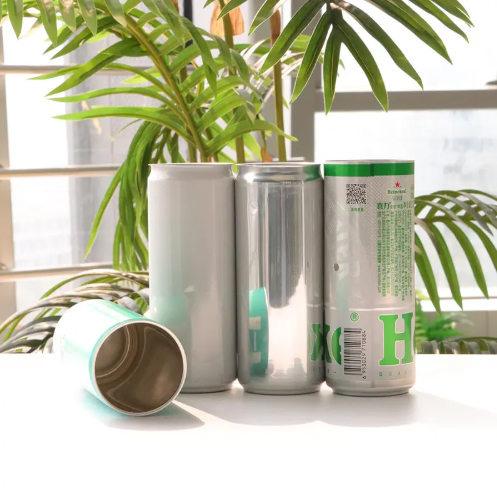
Custom Printed Aluminum Cans: Printing Methods, MOQ and Design Guide
Views: 0 Author: Site Editor Publish Time: 2026-10-16 Origin: Site
You started a small drink brand. Now you want your logo on a real can for your first store launch. Good news: you can order custom printed aluminum cans with your own design.
Three choices shape your project. First, pick a printing method. Second, learn about the minimum order quantity (MOQ). Third, get your design files ready the right way.
What Are Custom Printed Aluminum Cans?
These are aluminum cans printed with your brand's pictures, colors, and words. They work well for craft sodas, sparkling water, ready-to-drink coffee, and printed beer cans. Small brands testing a market, big companies launching a new flavor, and buyers looking for private-label custom beverage cans all gain from them. You can pick standard, sleek, or slim cans based on your product.
Key Takeaways
Pick a printing method that works for your order size and budget.
Know your MOQ: it depends on the printing method and how many designs you have.
Get your design files ready in CMYK with the right resolution and safe zones.
Ask for a real sample to check the colors and quality before you make the full order.
Begin with labels on plain cans to try out designs without high minimums.
How Designs Get Printed Onto Aluminum Beverage Cans
You have a design ready. Now you need to know how it gets onto the metal. There are several can printing methods, and each one fits a different production size. Your order size, your budget, and how complex your artwork is all help you decide.
Dry Offset and Digital Printing
Dry offset printing is the old-school standard for large orders of custom printed aluminum cans. Flexible printing plates wrap around a blanket cylinder. Ink moves from the plate to a rubber blanket, then onto the can. A protective varnish seals the image. This method can put up to seven colors on in one pass. It also supports glossy, matte, frosted, and tactile finishes. For artwork, you must send color separations, bleed, trapping, and varnish specs. Avoid very fine text near the seam. Keep enough contrast for required regulatory information. The printer runs color drawdowns and printed samples for your approval. Inline inspection then checks registration and coverage during the whole run.
Digital printing gives you lower MOQs and more flexibility for short runs. You do not need engraved plates. Setup after artwork approval is almost instant. Runs of tens of thousands or fewer become affordable. Every can can have its own design. This allows seasonal labels, regional editions, or one-off custom-printed cans without extra tooling. Modern digital presses make sharp, vibrant prints at about 600–900 DPI with strong wear resistance. This digital direct to can printing process also cuts waste. You skip plates and shrink sleeves, which lowers material use.
Shrink Sleeve and Specialty Inks
Shrink sleeve printing works well for smaller amounts and complex designs. A printed sleeve wraps around a blank can and shrinks to fit. This method gives you unlimited colors, including neon and metallic finishes. It also stands up to moisture, scuffs, and wear. Lead times run about 4 to 5 weeks, compared with 10 to 12 weeks for direct printing. Minimum order quantities can be as low as 1,000 sleeves. You can order blank aluminum cans in bulk and label them for different SKUs as demand shifts. This flexibility helps when you test a new flavor without committing to a full print run.
Specialty inks add effects that plain printing cannot match. Thermochromic ink changes color when the drink reaches its ideal temperature. Tactile varnish adds a wet look and a sensory feel. Photochromic ink shifts color in sunlight. Day Glo inks stay bright with or without UV light. Interactive codes like QR or Digimarc connect the can to digital content. These options turn a simple can into a consumer experience.
JinZhou supports your project with OEM services. The company helps with artwork preparation, size selection, and custom printing. You can choose Standard, Sleek, or Slim custom aluminum cans in various sizes. Every can uses 3104 aluminum alloy and passes multiple inspection stages. With an annual capacity of 15 billion cans, JinZhou serves brands worldwide.
MOQ for Printed Aluminum Cans
The minimum order quantity for printed aluminum cans is not just about can volume. The number of artworks and design stability also affect your moq. When you order multiple SKUs, each design splits the production run and adds changeovers. This makes your moq go up. A single stable design keeps costs lower and production smoother.
Typical MOQs by Printing Method
Each printing method has its own moq for aluminum cans. Dry offset printing needs the highest volumes. Traditional lithographic dry offset printing requires 300,000 to 1,000,000+ units per design run. This method allows up to seven colors and gives excellent color accuracy at truckload volumes. However, the moq for printed aluminum cans through this route stays high.
Digital can printing offers much lower minimums. You can order about 1,556 to 2,024 cans per design for 12oz Standard, 12oz Sleek, and 16oz Standard sizes. This low threshold exists because digital printing needs no plate tooling. You avoid the large production runs that offset printing requires.
Shrink sleeve printing gives you another flexible path. Shrink sleeve cans only need a minimum order quantity of 1/2 pallet, around 4,000 cans. According to Tango Packaging, the average moq for shrink sleeves is 1,000 sleeves. This sits far below direct printing minimums of 100,000 to 150,000 cans.
Printing Method
MOQ Range
Dry offset
300,000 to 1,000,000+ units per design
Digital
1,556 to 2,024 cans per design
Shrink sleeve
1/2 pallet (~4,000 cans) or 1,000 sleeves
Printed cans allow for up to 7 colors, offering high-quality, detailed designs. However, they come with a higher minimum order quantity (MOQ).
Tips for Small Businesses
You can test a design before you commit to direct printing. Start with labels on blank cans. Labels allow precise color reproduction, arrive quickly, and cost less than direct printing. You can mix and match designs for different varieties or limited editions. This approach lets you produce batch sizes as needed and match demand without holding excess stock.
Consider a mixed-color trial order to reveal print consistency before a larger commitment. Ask your supplier whether the moq applies per design, size, or combined order. Compare minimum order quantities, setup fees, lead times, and replacement policies across suppliers. Ask how they control batch-to-batch color changes. Keep important text away from seams and curves. Test final artwork under real lighting conditions.
JinZhou supports small businesses with flexible options. The company offers Standard, Sleek, and Slim aluminum cans in various sizes. Every can uses 3104 aluminum alloy and passes multiple inspection stages. With an annual capacity of 15 billion cans, JinZhou serves brands worldwide. You can request samples or consult their team before committing to a full run.
Design Guide for Printed Aluminum Cans
Printing on metal is not like printing on paper. Aluminum is not white, it does not soak up ink, and it has a curved shape. Your artwork file must handle these differences before production starts.
File Prep, Color, and Resolution
Begin with the right can template. Use a dieline made for your exact can size and format, like 12oz sleek or 16oz standard. This template shows the printable area, margins, seam zones, and safe areas. Never resize artwork from a different can format.
Create your design in CMYK color mode. RGB files cause color shifts that are hard to predict during conversion. Bright blues may turn purple, and vivid greens can look dull. Convert your files before you submit them. For raster images, provide them at 300 DPI at final print size. Some digital can printing workflows prefer 700 DPI for sharper detail. Vector artwork works best for logos and text.
Turn all fonts into outlines. Embed all images instead of linking them. Make separate layers for white ink, metallic effects, or varnish. Small text should be one color and at least 7pt. Line weights should be 0.1mm or thicker.
Bleed, Safe Zones, and Pitfalls
Keep important text and details inside safe zones. Stay 15mm away from the neck and chime. This stops important content from wrapping around curves or getting cut off. Place barcodes vertically on solid, high-contrast backgrounds. Avoid metallic areas behind barcodes.
Direct printing gives you a seamless, premium finish with full wrap coverage. Plan where you want exposed aluminum or metallic effects. Areas without white ink look metallic. Define embellishments like matte, gloss, or raised ink clearly.
Review your artwork at 100% scale. Check gradients for banding. Avoid ultra-thin fonts and fine drop shadows. Test scannability before final approval.
JinZhou also offers plastic can holders as a complementary packaging option. The 4-pack holder measures 130130mm, and the 6-pack measures 130195mm. Both use durable HDPE plastic for secure multipack carrying.
You now hold the three keys to a smooth first run. Match your printing method to your volume. Understand what drives your MOQ, including artwork count and design stability. Prepare your files with correct color mode, resolution, bleed, and safe zones.
Before you commit, request a sample. A physical proof shows how your design looks on a curved, shiny surface. An OEM partner like JinZhou can guide your artwork, size selection, and printing choices from start to finish.
Start your design draft today. Contact a supplier for a quote on your printed aluminum cans, and turn your label idea into a shelf-ready product.
FAQ
What is the MOQ for custom printed aluminum cans?
Your moq depends on the printing method. Dry offset needs large runs. Digital and shrink sleeve allow smaller batches. The number of designs also raises your moq. Ask your supplier for the exact moq for your can size and artwork count.
Can I get a sample before I commit to a full run?
Yes. Always request a physical proof. A sample shows how your colors look on a curved, shiny surface. It also reveals registration and finish quality. Review the sample under real store lighting. Approve it before you pay for a full production run.
How should I prepare colors for printing on aluminum cans?
Use CMYK color mode from the start. Convert RGB files before you submit them. Bright blues and greens may shift during conversion. Provide raster images at 300 DPI at final size. Vector files work best for logos and text. Turn all fonts into outlines.
What is the typical lead time for a custom can order?
Lead times vary by method. Shrink sleeve runs take about 4 to 5 weeks. Direct printing takes 10 to 12 weeks. Add time for artwork approval and sample review. Ask your supplier for a schedule before you plan your launch.
Can I use labels instead of direct printing?
Yes. Labels on blank cans let you test a design without a high moq. You can mix designs for different flavors or limited editions. Labels arrive faster and cost less than direct printing. Switch to direct printing once your design proves itself.